Is Ethernet Faster Than WiFi? A Complete Speed Comparison
Introduction
The question at the heart of modern home networking remains deceptively simple: is Ethernet faster than WiFi? For anyone who has ever watched a video buffer or felt a game stutter, the answer carries real consequences. The short, direct answer is yes—Ethernet is faster than WiFi in nearly every real-world scenario you will encounter. But understanding why Ethernet is faster than WiFi requires looking beyond the theoretical speeds printed on retail boxes. The truth involves physics, interference, hardware limitations, and the difference between peak performance and consistent delivery.
In the UK and USA, where remote work, 4K streaming, and competitive gaming are now household norms, settling this debate matters more than ever. Most consumers pay for broadband packages promising 500 Mbps or 1 Gbps, yet over 70% of that speed can vanish when relying on wireless. That is not an exaggeration; that is the measurable cost of radio frequency congestion. This comparison exists to give you the clarity you need—whether you are a developer pushing large builds, a gamer chasing low ping, or simply someone who wants their internet to work as advertised. We will examine actual speed tests, break down latency and jitter, and explore what different Ethernet cables can deliver.
What Ethernet and WiFi Actually Are
Ethernet is a wired networking technology that connects devices through physical cables, typically using copper wiring with RJ45 connectors. Data travels as electrical signals along a dedicated path from your router or switch directly to your device. WiFi, by contrast, is a wireless technology that uses radio frequencies—most commonly 2.4 GHz, 5 GHz, and the newer 6 GHz band—to transmit data through the air. This fundamental difference in how data travels explains most of the performance gap between the two.
Is Ethernet Faster Than WiFi? A Complete Speed Comparison
The Speed Difference: Theory versus Reality
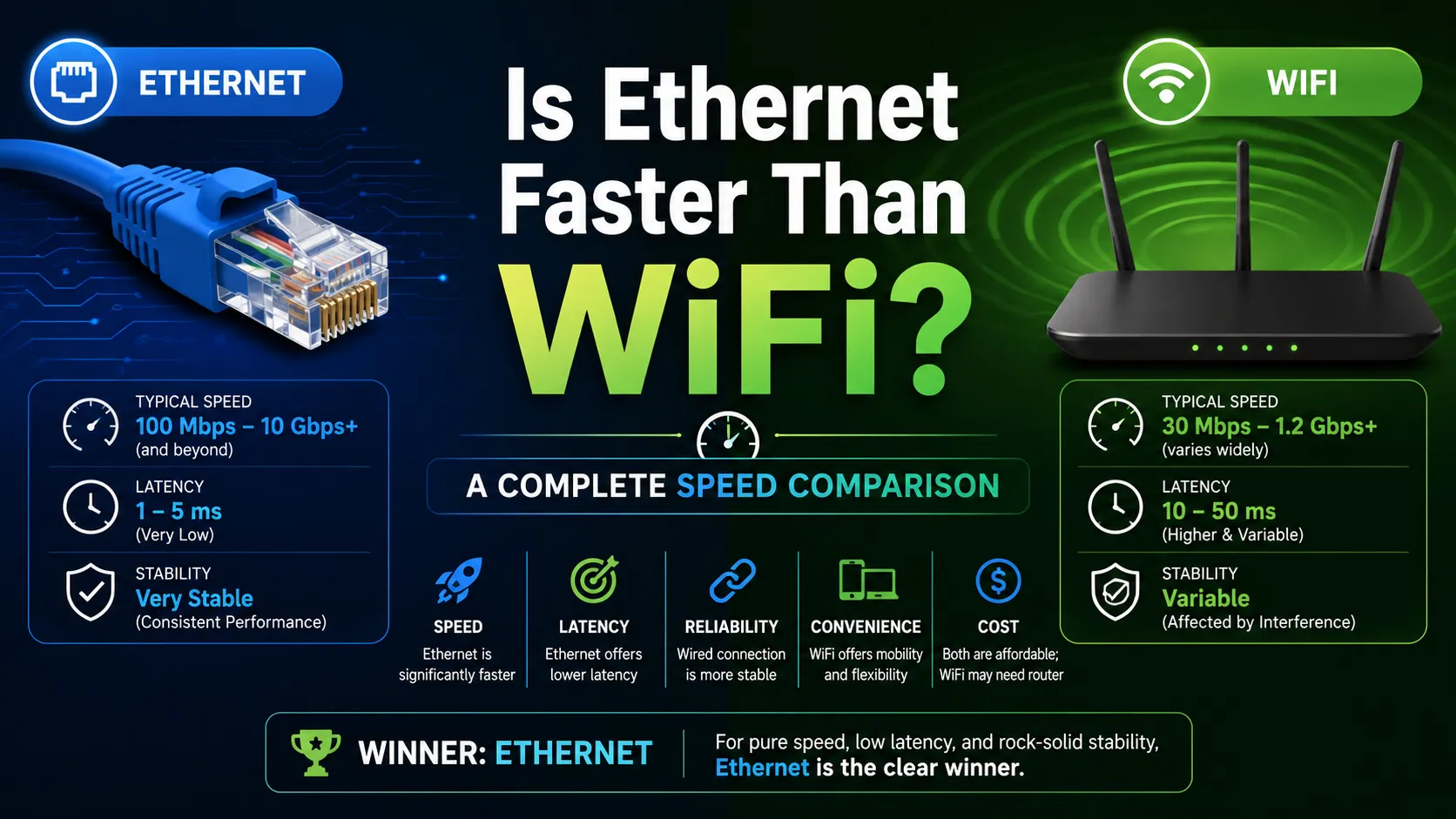
On paper, the gap between Ethernet and WiFi has narrowed considerably. Modern Ethernet cables like Cat6 and Cat6a support speeds up to 10 Gbps. WiFi 6 promises theoretical speeds of up to 9.6 Gbps, and WiFi 7 pushes that even further to a potential 46 Gbps. But theoretical maximums are misleading. In practice, WiFi rarely achieves its advertised peak speeds. Real-world WiFi 5 typically delivers 300–500 Mbps, while WiFi 6 and 6E might reach 800 Mbps or more under ideal conditions. A wired Gigabit Ethernet connection, using a standard Cat5e or Cat6 cable, consistently delivers 800–940+ Mbps in most homes.
Why WiFi Slows Down in Practice
WiFi speeds degrade for several reasons that Ethernet simply avoids. Signal strength drops with distance from the router. Other wireless devices—neighboring networks, microwaves, cordless phones—create interference on the same frequencies. And when multiple devices share the same WiFi network, they compete for available bandwidth, causing congestion. Ethernet suffers from none of these problems. The cable provides a dedicated, interference-free connection that maintains its speed regardless of what else is happening in your home.
Latency and Stability: The Hidden Performance Factors
Speed is only part of the story. Latency—the delay before data begins to transfer—often matters more than bandwidth for interactive activities. Ethernet connections generally provide lower latency on local networks, typically between 1 and 5 ms, whereas Wi-Fi connections often experience delays ranging from 5 to 30 ms or higher, along with more noticeable latency fluctuations. These spikes, known as jitter, can disrupt gaming, video calls, and remote desktop sessions. A wired connection eliminates these fluctuations because the data path is constant and uninterrupted. For competitive gaming, where milliseconds determine outcomes, Ethernet remains the clear choice.
The Cable Matters: Choosing the Right Ethernet Standard
Not all Ethernet cables are equal. The category of cable you use directly affects the maximum speed you can achieve.
Cat5e supports up to 1 Gbps at 100 MHz and is sufficient for most home networks. Cat6 handles 1 Gbps over full distance and 10 Gbps for runs under 55 meters, with a 250 MHz bandwidth. Cat6a supports 10 Gbps at 500 MHz over the full 100-meter length, making it the choice for future-proofing. Your device’s network interface card (NIC) also imposes a limit—most consumer devices have 1 Gbps ports, though 2.5 Gbps and 10 Gbps are becoming more common.
When WiFi Makes Sense
Despite its performance disadvantages, WiFi remains the right choice for many situations. Mobility is the primary advantage. Phones, tablets, and laptops are designed to move around, and cables defeat that purpose. WiFi also offers convenience—no drilling, no running cables through walls, and no clutter. For casual browsing, social media, video streaming, and even many work tasks, WiFi provides more than enough speed. The key is matching the connection type to the activity.
When You Should Choose Ethernet
Certain devices and activities benefit enormously from a wired connection. Gaming consoles and gaming PCs should use Ethernet for the lowest possible ping and minimal jitter. Desktop workstations that handle large file transfers, video editing, or cloud backups will see noticeably faster and more consistent performance. Streaming devices for 4K and 8K content benefit from the stability, even though 25 Mbps is technically sufficient for 4K. Any device that stays in one place—smart TVs, set-top boxes, printers, and security systems—is a candidate for Ethernet.
A Practical Test: What the Numbers Show
Real-world tests consistently demonstrate the Ethernet advantage. In one comparison, WiFi delivered download speeds of around 126 Mbps, while the same connection over Ethernet reached 395 Mbps—only 5 Mbps shy of the provider’s advertised maximum. Another test found WiFi speeds roughly 17 Mbps slower than Ethernet for downloads, though uploads were sometimes faster over wireless. These differences accumulate over time. A large game download that takes an hour on WiFi might finish in twenty minutes on Ethernet.
Security Considerations
Ethernet offers inherent security advantages. Data travels through a physical cable, making it far harder to intercept than radio waves that broadcast through the air. WiFi, even with WPA2 or WPA3 encryption, remains vulnerable to packet sniffing, spoofing, and brute-force attacks if not properly configured. For sensitive work—financial transactions, confidential documents, and remote access to corporate networks—a wired connection provides an extra layer of protection.
Can WiFi Ever Match Ethernet?
Modern WiFi standards are closing the gap. WiFi 6 and 6E can deliver impressive speeds in ideal conditions, and WiFi 7 promises to exceed Gigabit Ethernet in raw throughput. But the gap in consistency remains. WiFi will always be susceptible to interference, congestion, and signal degradation because it relies on a shared, unlicensed medium. Ethernet provides a private, dedicated path. For the foreseeable future, Ethernet will remain faster and more reliable in practice, even if the theoretical numbers converge.
Making the Right Choice for Your Home
The decision between Ethernet and WiFi is not binary. Most homes benefit from using both. Hardwire stationary, performance-critical devices—gaming PCs, consoles, workstations, and streaming boxes—and rely on WiFi for mobile devices and casual use. This hybrid approach gives you the best of both worlds: speed and stability where you need them, convenience and flexibility everywhere else.
Is Ethernet Faster Than WiFi? A Complete Speed Comparison
Conclusion
Ethernet is faster than WiFi, and that is unlikely to change. The physics of a dedicated cable versus a shared radio spectrum ensure that wired connections will always offer superior speed, lower latency, and greater reliability. But speed is not the only metric that matters. WiFi delivers something Ethernet cannot: freedom. The smart approach is not to choose one over the other but to use each where it excels. Wire what matters most. Leave the rest wireless. Your network will perform better, and so will you. Evaluate your devices, run a few speed tests, and make the call based on your actual needs, not the marketing numbers.
FAQs
Is Ethernet always faster than WiFi?
Yes, in real-world conditions. Ethernet provides consistent, dedicated bandwidth while WiFi speeds fluctuate due to interference, distance, and network congestion.
Does Ethernet reduce lag for gaming?
Significantly. Ethernet delivers lower and more stable latency (1–5 ms) compared to WiFi, which often spikes above 30 ms. This makes a noticeable difference in competitive titles.
Can I use both Ethernet and WiFi on the same network?
Absolutely. Most routers support simultaneous wired and wireless connections. Use Ethernet for stationary devices and WiFi for mobile ones.