Ring Mouse: A Definitive Guide to Wearable Cursor Control
Introduction
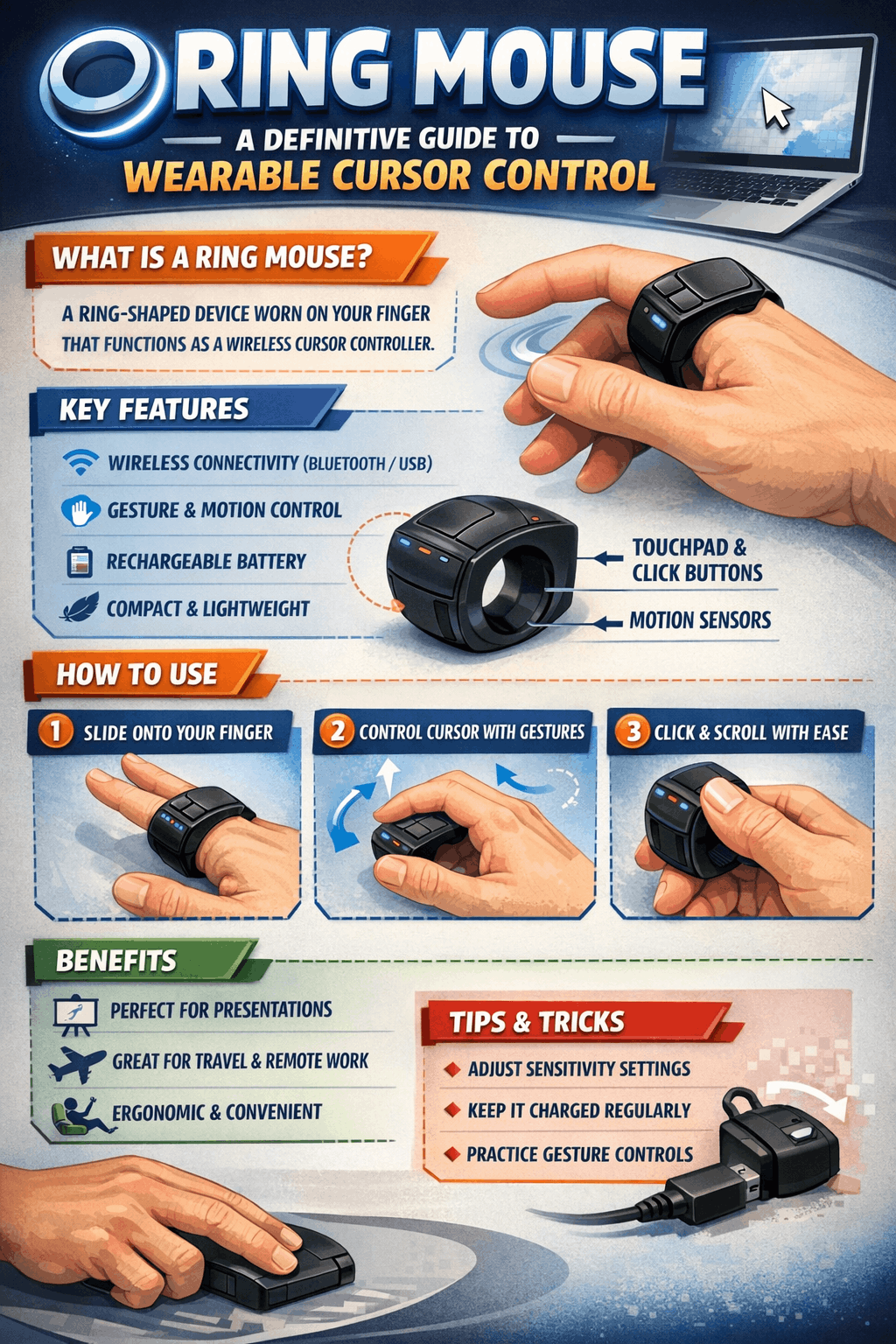
The Ring Mouse represents a significant evolution in human-computer interaction, shifting the paradigm from desktop peripherals to wearable technology. This wearable cursor control device is designed to be worn on a finger, typically the index, and allows users to point, click, scroll, and execute gestures directly from their hand. Unlike a traditional mouse or trackpad, a finger-worn mouse provides unprecedented portability and freedom, enabling control without a flat surface—ideal for presentations, media consumption, and mobile workflows. A Ring Mouse is a wearable computing input device that provides cursor control via a ring worn on the finger. Moving beyond the constraints of traditional mice and trackpads, this wearable cursor control interface signifies a shift towards ultra-portable and ergonomic human-computer interaction. As technology evolves from prototypes to commercial products, understanding the latest features, benefits, and applications of the Ring Mouse is essential for anyone evaluating modern input methods.
Ring Mouse: A Definitive Guide to Wearable Cursor Control
Core Technology and User Interaction
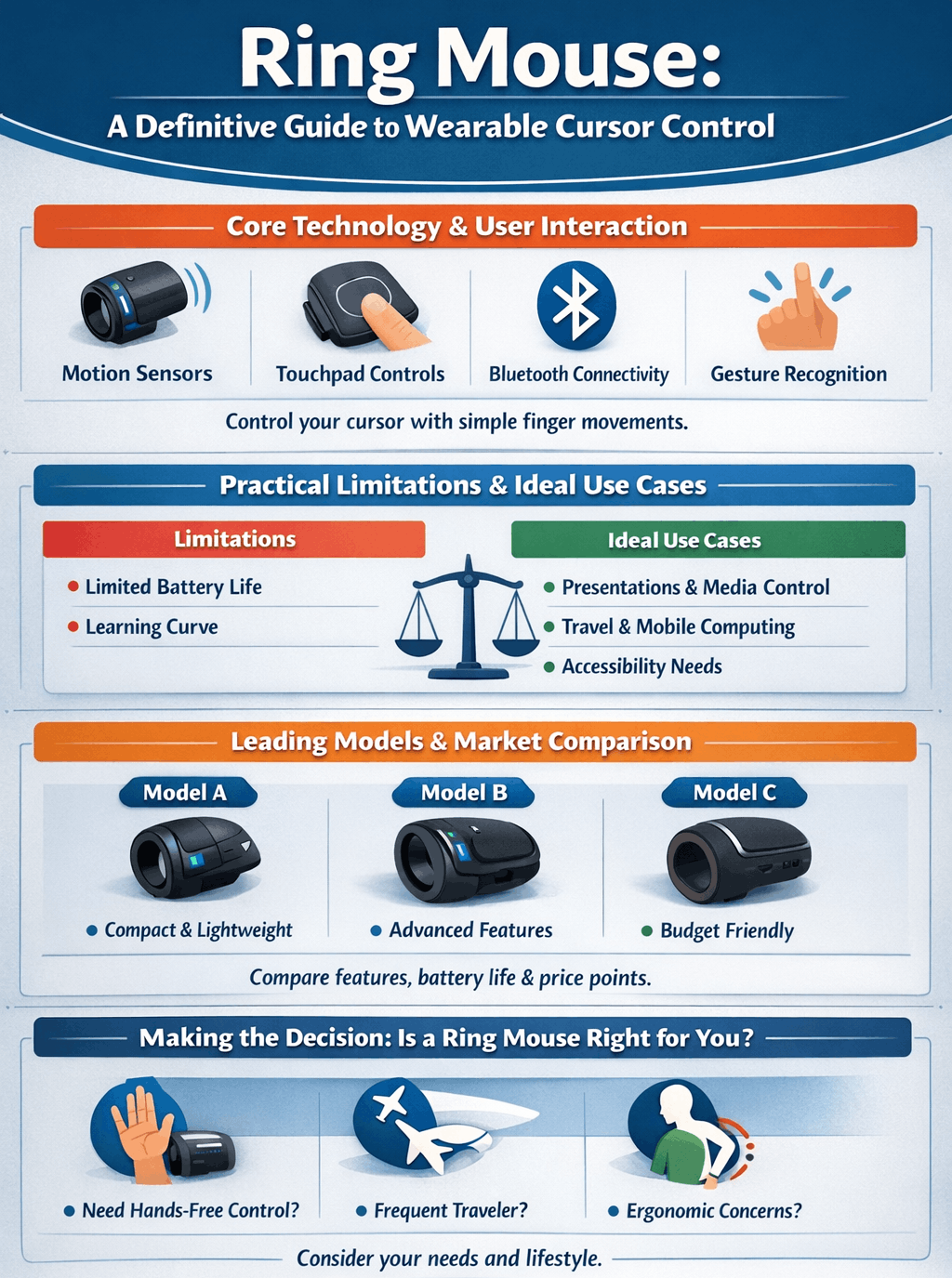
A modern ring mouse integrates several key components to replicate and extend traditional mouse functions. The primary interface is a miniature capacitive touchpad, often positioned for thumb interaction, which handles cursor movement, clicks, and swipes. Advanced models incorporate a 6-axis motion sensor (combining an accelerometer and gyroscope) to enable air gesture control, allowing users to perform commands like switching windows or controlling media playback with subtle finger movements. A third component, sometimes called a “modstrip,” acts as a modifier key to unlock additional functions from the touchpad. This combination allows the ring to function as a full mouse replacement or a complementary shortcut device, keeping a user’s hands primarily on the keyboard.
Key Benefits: Portability, Ergonomics, and Versatility
The advantages of a ring mouse are clear in specific use cases. Its most significant benefit is absolute portability; being worn on the finger, it eliminates the need for a desk and is always ready for use, making it a powerful tool for presentation control and travel-friendly computing. For professionals who present regularly, it offers a sleek, modern alternative to clunky clickers. From an ergonomic perspective, it can potentially reduce strain by allowing a more natural hand position compared to a traditional mouse, though it requires an adaptation period. Its multi-device compatibility via Bluetooth allows seamless switching between a PC, laptop, tablet, and even smart TVs, consolidating control into one wearable device.
Practical Limitations and Ideal Use Cases
Despite its innovation, the ring mouse is not a universal replacement for a traditional mouse. Its primary constraint is precision limitation; the small touchpad surface area can make high-accuracy tasks like detailed photo editing, 3D modeling, or competitive gaming challenging. There is also a user adaptation curve; mastering thumb control and air gestures requires practice, and some users report initial difficulty with sensitivity and accidental inputs. Furthermore, battery life for active use typically ranges from 8 to 12 hours, necessitating regular charging, though companion cases can extend total uptime significantly. Therefore, its ideal role is as a secondary control device for specific scenarios: delivering presentations, browsing media from a couch, traveling light, or providing an alternative input method to combat repetitive strain.
Leading Models and Market Comparison
The market features distinct product categories, from affordable generic models to sophisticated crowdfunded innovations. Entry-level models, like those from ByteWave or VAPI, offer basic cursor control, clicking, and scrolling at a lower price point (often $40-$60). They prioritize function and broad compatibility. In contrast, advanced platforms like the Prolo Ring focus on a comprehensive ecosystem. Promising “full desktop control,” they emphasize premium materials, extensive gesture customization (over 40 air gestures), and sophisticated software for creating macros. Another category includes research prototypes like the University of Tokyo’s picoRing, which uses ultra-low-power communication via a wrist relay to achieve battery life exceeding one month, highlighting future directions for AR and VR applications.
Making the Decision: Is a Ring Mouse Right for You?
Before purchasing, evaluate your primary needs. This device excels if your priorities are ultra-portability, presentation prowess, or casual, surface-free browsing. It is less suitable as a primary tool for precision-dependent creative work or long-duration, high-intensity computing sessions, where a traditional mouse remains superior. Consider your willingness to invest time in the learning curve to build muscle memory for thumb control. For most users, the ring mouse serves best as a powerful situational tool rather than a complete daily driver. The question to ask is not if it can replace your mouse, but where in your workflow it can create new efficiencies and freedoms.
| Product Name | USD Price | Key Features/Notes |
| Prolo Ring – Basic Edition (Pre-Order) | $161 | Premium wearable cursor with a high-resolution trackpad, 20+ built-in functions, and wide device compatibility. Ships in 2026. |
| Prolo Ring – Pro Edition (Pre-Order) | $232 | Advanced Prolo Ring with more gesture customization, designed for power users. |
| AirPoint® Ring (Amazon) | ~$149 | A well-known 2-in-1 “air” and surface mouse with 6-axis motion control and presentation features. |
| SANWA 3-in-1 Bluetooth Finger Ring Mouse (Amazon) | $40 | Versatile device functioning as a mouse, presentation clicker, and media scroller. Direct price from US store. |
| ZOZVO Tiktok Scrolling Ring (Amazon) | $36 to $30 | Primarily a media scroller for TikTok, the Kindle app, and camera control, with basic mouse cursor functions. |
| AirKLC Finger Ring Mouse Pro | $58 | A wearable mouse that includes a USB dongle for devices without Bluetooth. |
Ring Mouse: A Definitive Guide to Wearable Cursor Control
Conclusion
The ring mouse is a compelling manifestation of the trend toward more intimate and mobile computing interfaces. It successfully addresses clear pain points related to portability and ergonomic flexibility, carving out a legitimate niche in the peripherals market. While technological constraints in precision and battery life prevent it from being a total replacement, its value as a specialized tool for presenters, travelers, and multi-device users is undeniable. As underlying sensor and battery technology advances—as seen in research like the picoRing—future iterations will likely become lighter, more powerful, and more intuitive. For now, adopting a ring mouse is about strategically enhancing your workflow with a touch of the future. Evaluate your specific needs, and you may find it unlocks a new level of control.
FAQs
Can a ring mouse completely replace my traditional mouse?
For most users, no. It is excellent for portability and presentations but lacks the precision for detailed graphic design, CAD work, or competitive gaming, where a traditional mouse is still superior.
How long does the battery typically last?
Active use battery life generally ranges from 8 to 12 hours on a single charge. Many models come with a charging case that can provide multiple full recharges, extending total use to several weeks.
Is it compatible with all my devices?
Most ring mice use standard Bluetooth and are broadly compatible with Windows, macOS, Android, and iOS devices. Some also include a USB receiver for computers without Bluetooth.