What Is a Security Firewall, and How Does It Work?
Introduction
Modern businesses face constant digital risks, making a strong Security Firewall essential for safe online operations. A well-designed Security Firewall supports cybersecurity by enabling network protection, threat detection, intrusion prevention, and malware defense across devices and cloud systems. It strengthens data privacy, improves firewall configuration, and works with VPN, web filtering, and endpoint security to block attacks. With zero trust principles and smart monitoring, a Security Firewall helps organizations stay resilient, protect customer information, and maintain trust while scaling in a connected world where cyber threats evolve daily and require proactive, adaptive, layered security strategies for modern digital environments.
This article will define the essential firewall types and explain the precise mechanisms of how a firewall works, providing a clear technical framework for professionals.
What Is a Security Firewall, and How Does It Work?
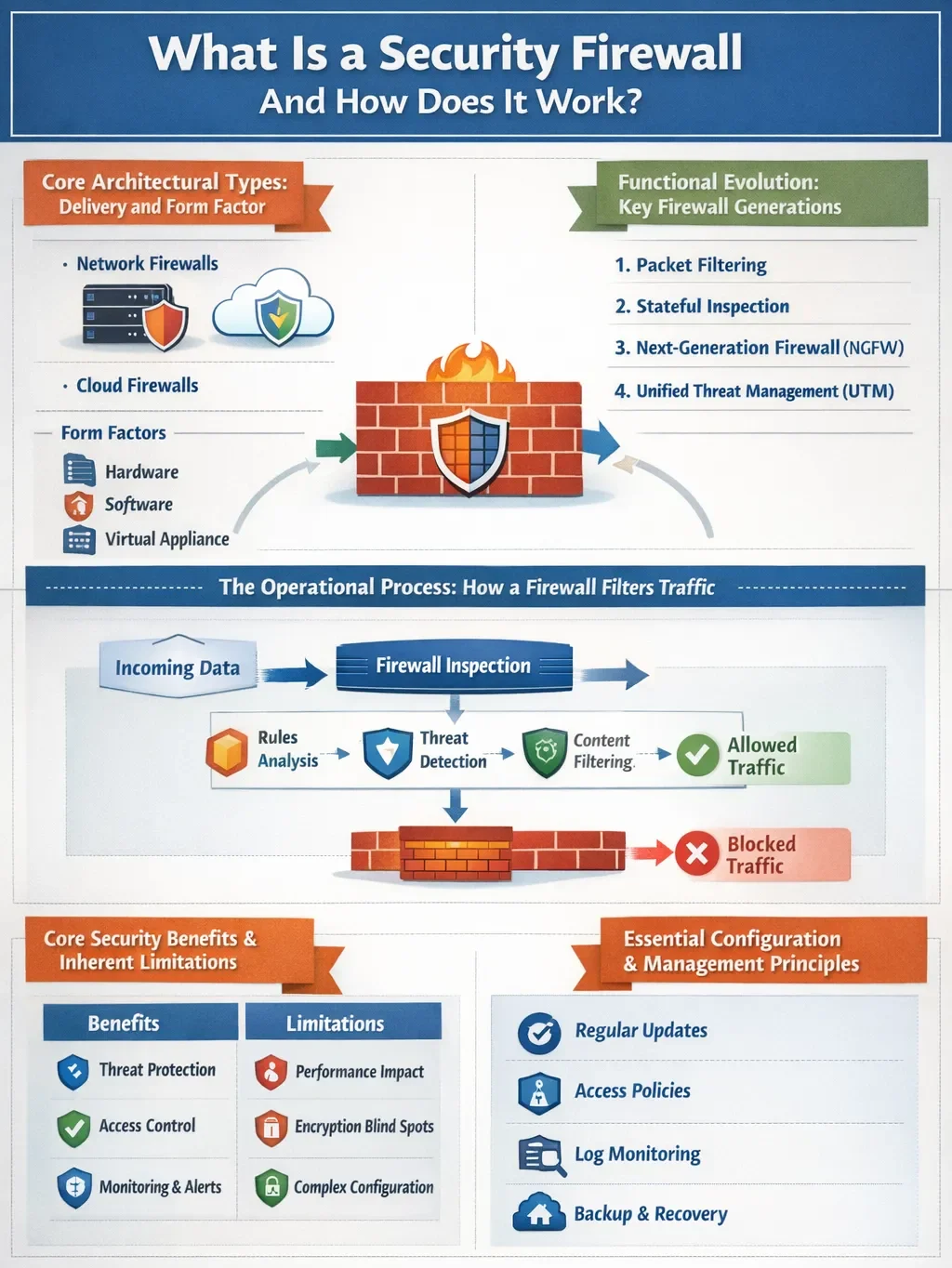
Core Architectural Types: Delivery and Form Factor
Firewalls are categorized first by their deployment model, which dictates where and how they are implemented within an infrastructure.
- Hardware Firewalls: These are physical appliances positioned at a network’s perimeter. They operate independently, protecting all downstream devices without consuming their resources. Ideal for securing an entire network edge, they can become a scaling challenge in distributed cloud environments.
- Software Firewalls: This form factor is a program installed directly on individual servers, endpoints, or virtual machines. It provides granular, host-based control and is crucial for micro-segmentation and securing cloud workloads. Management overhead increases as you must maintain the software on each protected asset.
- Virtual & Cloud Firewalls (FWaaS): These are software firewalls optimized for virtualized and cloud environments. Delivered as Firewall-as-a-Service (FWaaS), they offer scalable, centralized policy management for hybrid and multi-cloud architectures without physical hardware.
Functional Evolution: Key Firewall Generations
Firewall technology has evolved through distinct generations, each adding deeper inspection capabilities.
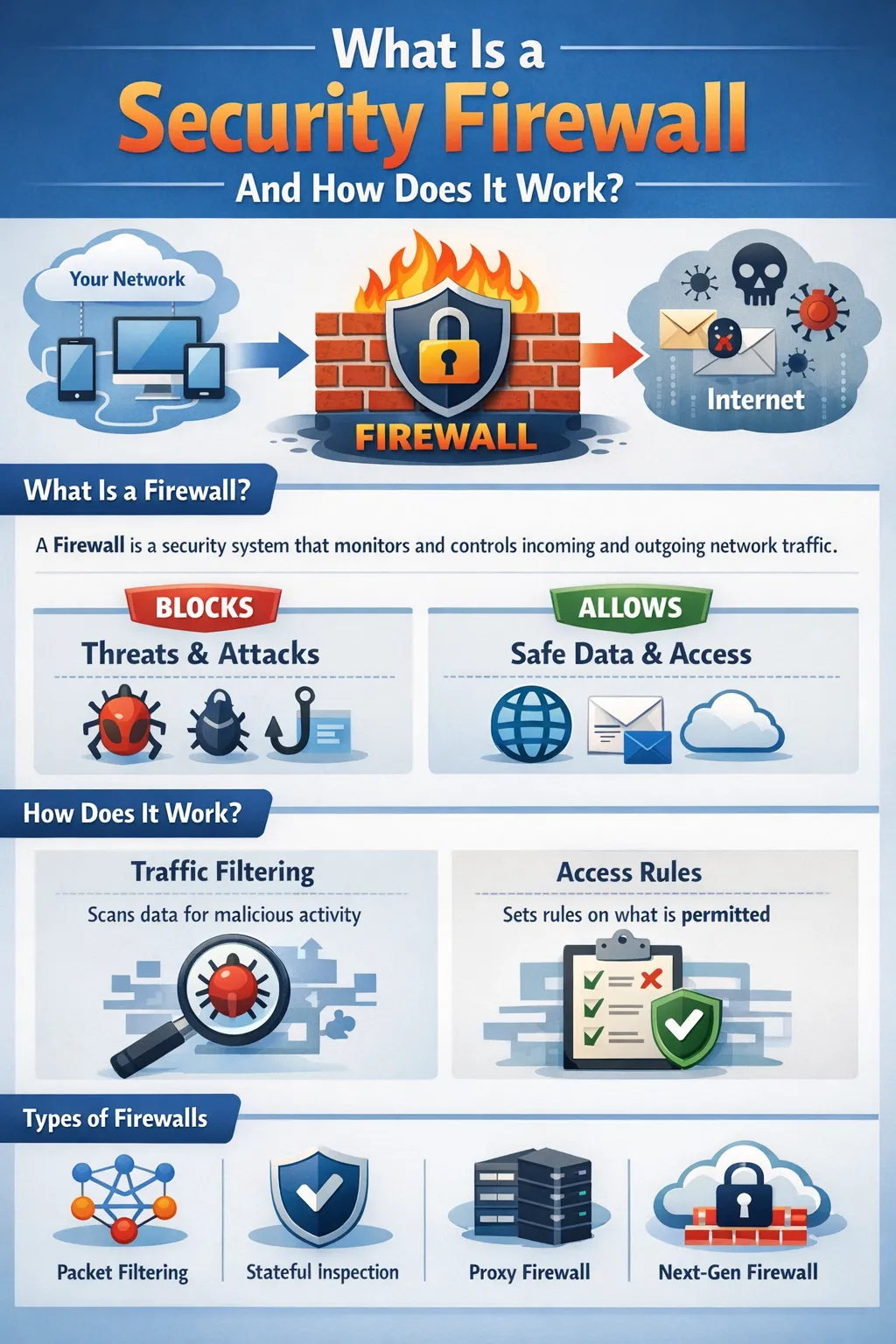
- Packet-Filtering Firewalls: The first generation. They make basic allow/deny decisions based solely on a packet’s header information: source/destination IP addresses, port numbers, and protocol. They are fast and simple but lack context, making them vulnerable to sophisticated spoofing attacks.
- Stateful Inspection Firewalls: This generation adds critical context. They track the state of active connections (e.g., TCP handshakes), understanding if a packet is part of an established, legitimate session. This provides stronger protection than simple packet filtering but does not inspect the actual data payload.
- Next-Generation Firewalls (NGFW): The modern standard. NGFWs integrate the capabilities of stateful inspection with advanced features like Deep Packet Inspection (DPI), intrusion prevention systems (IPS), and application-aware filtering. DPI allows the firewall to examine the content of the data packet itself, identifying malware, exploits, or unauthorized application traffic hidden within allowed protocols.
- Specialized Variants: Web Application Firewalls (WAF) are a specialized type designed to protect HTTP/HTTPS applications by filtering layer-7 traffic for specific web-based attacks. Unified Threat Management (UTM) devices bundle firewall capabilities with other services like antivirus and content filtering for simplicity.
The Operational Process: How a Firewall Filters Traffic
The operational sequence of a security firewall is a deterministic process applied to each data packet. How does a firewall work in practice? It follows a structured workflow:
- Traffic Interception: All data packets entering or leaving the secured network segment are intercepted by the firewall.
- Rule Examination: The packet’s header information (IPs, ports, and protocol) is extracted and compared against the firewall’s preconfigured rule set. Rules are typically processed in order.
- Contextual Analysis (Stateful/NGFW): If configured, the firewall checks the packet against its state table for session legitimacy or performs deep packet inspection to analyze content.
- Decision Execution: Based on the evaluation, the firewall enforces an action: ALLOW (forward the packet), DENY (block and notify the sender), or DROP (block silently).
- Logging: The action is recorded in a log file, which is essential for auditing, monitoring, and incident response.
Consider this: If an internal user requests a webpage (outbound TCP port 443), the stateful firewall allows it and records the session. The returning web server packets are allowed because they match the established session in the state table. Unsolicited inbound traffic on the same port, however, is blocked, as it has no matching active session.
Core Security Benefits and Inherent Limitations
A properly configured firewall delivers concrete security outcomes:
- Prevents Unauthorized Access: It is the primary barrier against external intrusion attempts.
- Blocks Malware and Exploits: By filtering traffic and using DPI/IPS, it can stop malicious code from entering the network.
- Enforces Network Policy: It operationalizes security policy by controlling which services (ports) are accessible and to whom.
- Supports Segmentation: Internal firewalls can segment network zones (e.g., R&D from HR), limiting lateral movement in case of a breach.
However, firewalls are not a panacea. They cannot protect against threats that bypass them, such as malware introduced via USB drives or social engineering attacks that trick users into compromising their credentials. Furthermore, encrypted traffic (like most modern HTTPS) presents a visibility challenge unless the firewall performs TLS decryption, which requires careful planning.
Essential Configuration and Management Principles
The effectiveness of any security firewall is entirely dependent on its configuration and ongoing management. Best practices are non-negotiable:
- Default-Deny Stance: The foundational rule should explicitly block all traffic, with permitted services added as specific exceptions.
- Principle of Least Privilege: Every rule should be as granular as possible, allowing only the minimal required access for a defined need.
- Regular Rule Audits and Patching: Rulesets must be reviewed quarterly to remove obsolete or redundant entries. Firmware and threat intelligence signatures must be updated promptly to defend against new vulnerabilities.
- Comprehensive Logging and Monitoring: Firewall logs should be aggregated into a SIEM (Security Information and Event Management) system for proactive analysis and alerting.
What Is a Security Firewall, and How Does It Work?
Conclusion
Understanding what a security firewall is and how it works is essential for building a resilient security posture. From its core function as a traffic filter to the advanced, context-aware intelligence of next-generation platforms, the firewall has adapted to meet modern threats. Its true efficacy, however, lies not just in the technology chosen but in the rigor of its governance—principles like least privilege, active segmentation, and continuous monitoring. As networks dissolve into hybrid clouds and edges, the firewall’s role evolves from a simple perimeter guard to a distributed policy enforcement engine, making strategic selection and disciplined management more critical than ever.
FAQs
What is the key difference between firewall networks and antivirus software?
A firewall is a network gatekeeper that controls traffic flow between networks, while antivirus software is an endpoint security tool that scans for and removes malicious software on a specific device.
Do I need a firewall if I already use a VPN?
Yes. A VPN creates an encrypted tunnel for your traffic but does not inherently inspect that traffic for threats. A firewall provides the essential inspection and filtering layer that the VPN transports.
Can a firewall stop all cyberattacks?
No. Firewalls are a critical first line of defense but are part of a layered security strategy. They cannot prevent attacks that originate from within the network or that rely on user deception, such as phishing.